Quick Summary: In this blog post, we will talk about Angular in micro frontend architecture, which includes scalable web applications, independent deployment, best practices, and a step-by-step guide on how to create a modular enterprise-ready Angular solution.
Previously, front-end web development was comparable to building an enormous skyscraper all at once. This method frequently resulted in inefficiencies and complications, especially for large-scale teams and projects. Nowadays, though, it’s more like building with LEGO bricks thanks to micro frontend architecture with Angular. In other words, before being assembled, each component can be constructed and tested independently. According to McKinsey research, organizations using micro frontends can speed up delivery by 30–50 percent with the same resources.
In addition to improving scalability and flexibility, this modular approach speeds up software development cycles and simplifies cooperation.
This blog will cover:
- What Angular micro frontend architecture is and why it matters
- How Angular supports scalable micro frontend development
- Key benefits and best practices of Angular micro frontends
- How to build micro frontends with Angular using Native Federation
- The role of Module Federation and Native Federation in Angular
- Angular alternatives for micro frontend architecture
- Real-world examples and practical use cases
- When Angular micro frontends are the right choice
What is Angular Micro Frontend Architecture?
Understanding what micro frontend architecture Angular is is essential before delving into Angular’s function.
Angular Micro Frontend is a concept that describes a new way of building a web application as a set of smaller, independently deployable modules using Angular. This method enables developers to build, test, and deploy different parts of a web application independently.
In micro frontend Angular architecture, each module or “micro frontend” operates as a self-contained application but integrates seamlessly into a larger system. For instance, one team could manage the user interface, another the payment system, and another the dashboard, all using Angular frameworks.
One of the most important advantages of micro frontend Angular architecture is scalability. The best tools and technologies for specific tasks can be chosen by teams by breaking down a massive monolithic program into smaller chunks. It also reduces interdependence, which makes the system robust and reduces the chances of overall issues.
This architecture is particularly useful for large-scale applications with multiple developers, ensuring modularity and improving development speed while maintaining Angular’s efficiency and performance for building dynamic web applications.
Let’s unravel a few more details!
How Does Angular Support Micro Frontend Architecture?
The well-known frontend framework Angular for front end offers a powerful toolkit for developing dynamic, one-page applications. Angular’s well-structured architecture, powerful tooling, and TypeScript integration make it an excellent choice for developing small frontends.
Angular supports the micro frontend framework ecosystem in the following ways:
Modular Structure
Hire Angular developers who can quickly integrate applications into a bigger micro frontend architecture by breaking them down into distinct modules using Angular’s built-in modularity. Angular modules facilitate the management of separate micro frontends by providing a clear separation of concerns.
Lazy Loading
Micro frontends can only load when required thanks to Angular’s lazy loading capability. Performance can be greatly enhanced by loading each micro front end architecture as needed, especially for large applications.
Injection of Dependency
The strong dependency injection mechanism of Angular guarantees the effective management of shared services and modules across several micro frontends. This facilitates code reuse, which lowers duplication and improves the architecture’s long-term maintainability.
Micro Frontend Architecture’s Advantages
The following are the top six benefits of micro frontend architecture:
- Separation of Concerns and Modularity: Using micro frontend architecture Angular, a large monolithic application may be split up into smaller, independent modules. Each module manages specific features, which allows teams to work autonomously. This setup minimizes conflicts between teams, as each module functions independently. It also enables faster iteration, allowing teams to make updates and improvements more efficiently.
- Independent Development and Deployment: With micro frontends, multiple teams can work on distinct modules at the same time. Version control, deployment pipeline, and development lifecycle can all be unique to each micro frontend. This allows for more frequent releases and quicker development cycles without affecting other program components.
- Better Collaboration: With distinct module boundaries and interfaces, it improves collaboration. This prevents overlap and enables teams to concentrate on their areas of competence. Therefore, code reuse and consistency are improved when components and services are shared among micro frontends.
- Scalability: It makes horizontal scaling easier by enabling separate module scaling according to resource needs and usage trends.
- Flexibility in Technology: It allows for flexibility in technical options because each micro frontend can be built using a different frontend framework or library. This keeps the application’s user experience consistent while allowing teams to take advantage of the advantages of various tools and technologies.
- Fault Tolerance and Isolation: It encourages module isolation, lessening the effect of problems or failures in one module on the application as a whole.
Angular Micro Frontend vs Monolithic Angular Architecture
While both architectures use Angular, the structural approach creates a major difference in scalability, deployment flexibility, and team autonomy.
Below is a practical side-by-side comparison to clarify when each approach makes sense.
| Feature | Angular Micro Frontend | Monolithic Angular |
| Scalability | High – Individual modules scale independently | Low – Entire application scales as one unit |
| Deployment | Independent deployments per domain | Single, unified deployment |
| Team Collaboration | Excellent – Domain-driven team ownership | Limited – Shared codebase creates coordination overhead |
| Release Cycles | Faster, isolated releases | Slower, full regression testing required |
| Fault Isolation | Failures contained within a micro frontend | Single failure can impact entire app |
| Technology Flexibility | Can mix frameworks if required | Locked into one stack |
| Build Performance | Smaller builds per micro app | Large build artifacts over time |
| Governance Complexity | Higher architectural discipline required | Simpler initially |
Monolithic Angular works well for:
- Small to mid-sized applications
- Single-team ownership
- Limited domain complexity
Angular micro frontend architecture becomes the better choice when:
- Multiple teams work in parallel
- Independent feature releases are required
- Long-term scalability and modular ownership matter
- Large enterprise applications evolve continuously
In enterprise environments, the shift from monolith to micro frontend is less about technology preference and more about organizational scalability.
What are The Best Practices of Angular in Micro Frontend Architecture?
In order to guarantee seamless integration, scalability, and maintainability, developers should adhere to specific best practices when implementing Angular micro frontends.
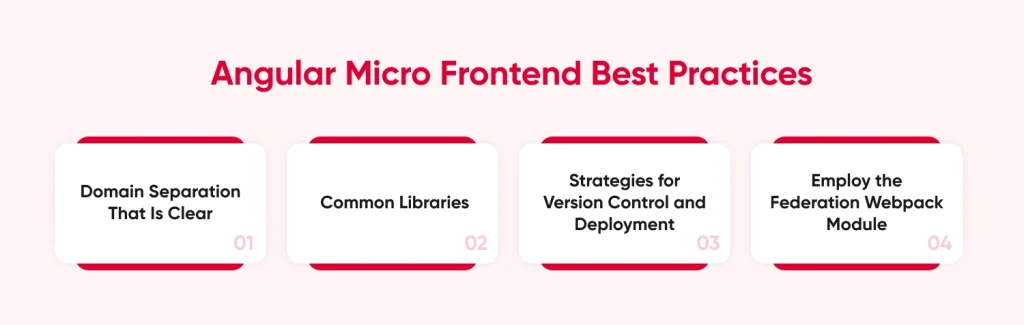
Here are the micro frontend best practices in Angular:
Domain Separation That Is Clear
Every micro frontend ought to manage a certain domain or feature. To avoid dependencies that could compromise the advantages of independence, keep micro frontends from overlapping.
Common Libraries
Use shared libraries for shared functionality across different micro frontends. For instance, shared modules can be used to centralize analytics, logging, and authentication. Sharing these web app development services is made easier by Angular’s dependency injection mechanism.
Strategies for Version Control and Deployment
Make sure that every micro frontend is deployed and versioned separately so as not to interfere with other application components. The deployment procedure for micro frontends is streamlined by Angular’s capacity to produce modular builds.
Employ the Federation Webpack Module
Building micro frontends is made easier by Webpack’s Module Federation, which enables dynamic imports of separately deployed modules. Because it facilitates smooth integration and sharing between several micro frontends, this method is quite advantageous when utilizing Angular for micro frontends.
Talk to our frontend specialists to build scalable, future-ready web platforms.
Contact UsHow to Implement Angular Micro Frontend Using Angular Module Federation
Module Federation enables multiple Angular applications to share and load code dynamically at runtime. It is powered by Webpack 5, allowing independently deployed applications to behave like a single cohesive frontend.
Important Note: Module Federation requires Webpack and is not compatible with Angular’s default esbuild pipeline. This works cleanly for Angular 14–16.
This section provides a structured implementation guide including:
- Webpack configuration
- Architecture diagram
- Shell and Remote explanation
- Nx workspace micro frontend vs Module Federation comparison
Step 1: Configure Webpack Module Federation
Angular CLI does not expose Webpack directly, so Module Federation requires extending the build system using a custom builder such as @angular-architects/module-federation.
Remote Application Webpack Config
module-federation.config.js
const { withModuleFederationPlugin, shareAll } = require('@angular-architects/module-federation/webpack');
module.exports = withModuleFederationPlugin({ name: 'mfe1', filename: 'remoteEntry.js', exposes: { './FlightsModule': './projects/mfe1/src/app/flights/flights.module.ts', }, shared: { ...shareAll({ singleton: true, strictVersion: true, requiredVersion: 'auto', }), },
});
What This Does
- name uniquely identifies the remote
- filename generates remoteEntry.js (runtime manifest)
- exposes defines which Angular modules are publicly available
- shared prevents duplicate Angular runtime instances
Angular Shell Application (Host) Webpack Config
const { withModuleFederationPlugin, shareAll } = require('@angular-architects/module-federation/webpack');
module.exports = withModuleFederationPlugin({ remotes: { mfe1: 'mfe1@http://localhost:4201/remoteEntry.js', }, shared: { ...shareAll({ singleton: true, strictVersion: true, requiredVersion: 'auto', }), },
});
Runtime Behavior
At runtime, the Angular shell application dynamically integrates federated modules from remote applications.
- Shell loads remoteEntry.js
- Webpack resolves exposed modules
- Shared dependencies are negotiated
- Angular module is mounted inside host
Step 2: Establish the Microfrontend Architecture
Below is a high-level runtime architecture of Angular Microfrontends using Module Federation.
Key Architectural Principles
- Independent builds
- Runtime integration
- Shared Angular runtime
- Feature-based ownership
- Independent deployments
Step 3: Implement the Shell Application
The Shell serves as the container and entry point for the system.
Shell Responsibilities
- Provides global layout
- Defines top-level routing
- Registers remote applications
- Manages cross-cutting concerns such as authentication
import { loadRemoteModule } from '@angular-architects/module-federation';
export const routes = [ { path: 'flights', loadChildren: () => loadRemoteModule({ type: 'module', remoteEntry: 'http://localhost:4201/remoteEntry.js', exposedModule: './FlightsModule', }).then(m => m.FlightsModule), },
];
This ensures:
- Remote modules are loaded on demand
- The shell remains lightweight
- Angular routing behavior is preserved
Step 4: Structure Remote Applications by Business Domain
Each Remote application should represent a clear business domain.
Remote Characteristics
- Standalone Angular application
- Independently deployable
- Owns a single domain
- Exposes feature modules
Example Domain Distribution
| Remote | Domain Responsibility |
| Flights | Search and booking |
| Payments | Checkout |
| Profile | User management |
| Admin | Back-office tools |
Best practice is to expose entire Angular feature modules rather than individual components to preserve encapsulation.
Step 5: Configure Shared Dependencies Correctly
To avoid multiple Angular runtimes, configure core libraries as singletons.
shared: { "@angular/core": { singleton: true, strictVersion: true }, "@angular/common": { singleton: true, strictVersion: true }, "@angular/router": { singleton: true, strictVersion: true }, "rxjs": { singleton: true, strictVersion: true },
}
Without singleton configuration:
- Multiple Angular instances may load
- Dependency injection breaks
- Change detection conflicts occur
- Bundle size increases
- Strict versioning ensures runtime safety.
Step 6: Decide Between Nx and Standalone Module Federation
Many enterprises use Nx to manage microfrontends within a monorepo.
| Aspect | Angular + Module Federation | Nx + Module Federation |
| Setup | Manual schematic setup | Generator-driven |
| Repository Model | Multi-repo or mono | Optimized monorepo |
| Dependency Graph | Manual | Automated |
| Incremental Builds | Not built-in | Supported |
| Build Caching | Manual | Advanced caching |
| CI Optimization | Custom | Built-in |
| Team Scalability | Moderate | High |
Choose Pure Module Federation When
- Teams are small
- Projects are separated into independent repositories
- Full Webpack control is required
Choose Nx with Module Federation When
- Working in a large enterprise environment
- Sharing multiple libraries across teams
- Optimizing CI/CD performance
- Managing many microfrontends in a monorepo
How To Implement Angular Microfrontend with Native Federation
Angular’s shift toward Standalone Components, esbuild, and browser-native standards has changed how microfrontends should be implemented. While traditional Module Federation depends on webpack, Angular 17 moves esbuild to the default build pipeline, making webpack-based federation impractical. Native Federation fills this gap by preserving the same mental model as Module Federation while remaining bundler-agnostic and fully compatible with esbuild.
Below is a practical, end-to-end approach to implementing Angular microfrontends using Native Federation.
Step 1: Create a Micro Frontend (Remote)
Native Federation provides an Angular CLI schematic to bootstrap a remote.
ng add @angular-architects/native-federation \ --project mfe1 \ --port 4201 \ --type remoteThis command:
- Configures the project as a remote
- Adds Native Federation to the build pipeline
- Generates a federation.config.js
Remote configuration example:
const { withNativeFederation, shareAll } = require('@angular-architects/native-federation/config');
module.exports = withNativeFederation({ name: 'mfe1', exposes: { './Component': './projects/mfe1/src/app/app.component.ts', }, shared: { ...shareAll({ singleton: true, strictVersion: true, requiredVersion: 'auto' }), }, skip: [ 'rxjs/ajax', 'rxjs/fetch', 'rxjs/testing', 'rxjs/webSocket' ]
});
Key points:
- name uniquely identifies the remote
- exposes defines which components or features can be loaded at runtime
- shared ensures Angular and other dependencies are loaded only once
- skip excludes unused or Node-only packages for better performance
Step 2: Set Up the Shell (Host)
The shell application dynamically loads one or more remotes.
ng add @angular-architects/native-federation \ --project shell \ --port 4200 \ --type dynamic-hostThis generates:
- A host-specific federation.config.js
- A federation.manifest.json inside assets
Manifest example:
{ "mfe1": "http://localhost:4201/remoteEntry.json"
}
Because the manifest is treated as an asset, it can be swapped during deployment, enabling environment-specific microfrontend composition.
Step 3: Initialize Native Federation at Runtime
The host must initialize federation before bootstrapping Angular.
import { initFederation } from '@angular-architects/native-federation';
initFederation('https://blog.cdn.cmarix.com/assets/federation.manifest.json') .then(() => import('./bootstrap')) .catch(err => console.error(err));
At runtime, Native Federation:
- Reads remote metadata
- Generates a browser-compatible Import Map
Resolves shared libraries and exposed modules dynamically
Step 4: Load Remote Components Lazily
Once federation is initialized, the shell can load remote components on demand.
import { loadRemoteModule } from '@angular-architects/native-federation';
export const APP_ROUTES = [ { path: 'flights', loadComponent: () => loadRemoteModule('mfe1', './Component') .then(m => m.AppComponent), }
];
This approach:
- Avoids eager loading
- Keeps shell and remotes independently deployable
- Preserves Angular router semantics
Step 5: Expose and Consume Full Feature Routes
Exposing a single component is often too granular. With Standalone Components, entire feature routes can be exposed instead.
Remote routing configuration:
export const APP_ROUTES = [ { path: 'flight-search', component: FlightComponent }, { path: 'holiday-packages', component: HolidayPackagesComponent }
];
Expose it in the remote:
exposes: { './routes': './projects/mfe1/src/app/app.routes.ts',
}
Consume it in the shell using loadChildren:
{ path: 'flights', loadChildren: () => loadRemoteModule('mfe1', './routes') .then(m => m.APP_ROUTES),
}
This pattern enables feature-level microfrontends without Angular modules.
Step 6: Share State Between Micro Frontends (With Caution)
Native Federation supports shared libraries for cross-MFE communication. A common approach is a shared Angular service.
Example shared service:
@Injectable({ providedIn: 'root' })
export class AuthService { userName = '';
}
Best practices:
- Share only minimal contextual data (user, tenant, filters)
- Prefer publish/subscribe patterns with RxJS
- Avoid tight coupling between MFEs
For monorepos, ensure consistent path mappings in tsconfig.json so all MFEs reference the same shared library.
Why This Architecture Works Long-Term
- esbuild compatibility aligns with Angular’s future
- Import Maps and ES modules rely on browser standards
- Tooling-agnostic design avoids bundler lock-in
- Standalone Components eliminate unnecessary Angular modules
Native Federation delivers the benefits of Module Federation without tying Angular microcontends to webpack, making it a future-proof approach for scalable Angular architectures.
Micro Frontend Architecture Patterns: Native Federation Vs. Module Federation
Module Federation revolutionized microfrontends by enabling:
- Runtime loading of independently deployed applications (remotes)
- Dependency sharing so Angular loads only once
- Clear host–remote boundaries
However, Module Federation is tightly coupled to webpack. Since Angular CLI now favors esbuild for faster builds (3–4x improvement in real projects), a webpack-only solution no longer fits Angular’s direction.
Native Federation solves this by:
- Working before and after the bundler
- Supporting esbuild, webpack, and other tools
- Using ECMAScript modules and Import Maps
- Retaining the same host/remote and shared dependency concepts
Which Angular Alternatives Are There For Micro Frontends?
Although integrating Angular with Micro frontends offers developers several benefits, it’s crucial to prevent black vision. Because each project is unique, it is equally necessary for developers to investigate various frameworks and methodologies. There are benefits to combining Angular with micro frontends, but it’s important to weigh your options.
Single-Page Applications
Single Page Applications (SPAs) can be seen as a flexible alternative. They offer a way to build and deploy independently developed frontend modules. SPAs can be built using frameworks such as React, Vue.js, and Svelte, which offer a way to build self-contained SPAs that can be combined into a single shell. This makes SPAs a good fit for organizations that prefer autonomy and flexibility in micro frontend architectures.
Monolithic Architecture
Monolithic designs can initially facilitate development. At first glance, it seems helpful that you have all of your code in one location. However, things can become complicated when your application expands and the codebase changes. Additionally, developers have a terrible time maintaining the code.
Other Frameworks
When it comes to front-end development, the community frequently discusses Angular. However, we cannot overlook React and Vue.js. These frameworks are also excellent options, and each has a devoted following. Both are capable of performing on par with Angular development services, particularly in Micro frontend settings.
Case Study: Using Angular Micro Frontend in Practice
Seeing how some of the biggest names in tech are using Angular with micro frontend architecture Angular to increase the modularity and scalability of their applications is intriguing. A few notable Micro frontend architecture Angular examples that highlight this trend are as follows:
DAZN
The international sports streaming service DAZN made the decision to use a micro frontend approach to update their intricate software. In order to divide their massive front end into more manageable, smaller components, they have chosen to use Angular. This made it possible for each of their teams to freely concentrate on particular software elements. For them, this significantly streamlined project update management and accelerated the development process. Having one team focus exclusively on the live streaming interface while another handles user account management sounds fascinating.
Halodoc
By integrating Micro frontends, this Indonesian health IT company employs Angular for every module of its Control Center app. This modification makes updates much easier and enhances the codebases’ organization. Their developer was able to say that their build times had been significantly shortened as a result. Additionally, shared responsibilities like state management and authentication were handled much more efficiently.

When Is It Appropriate to Use an Angular in Micro Frontend Architecture?
It is clear from this section that, in addition to Micro Frontend, Angular is important for creating scalable web applications. Let’s examine the potential applications of this framework for growth.
- One When Businesses Have Big Teams: Micro frontend architecture is the most appropriate for use in large projects. Every team member is given specific tasks to do without any delays.
- For intricate projects that necessitate individual deployment: For instance, a web application’s payment feature needs to be changed. No other functionality will be affected in that scenario. Businesses can employ developers or a specialized development team to ensure high-quality software is produced during the development of complex projects.
- When a Scalability Feature Is Needed: One important factor is that new tools for business transformation are constantly being introduced by technology. Supporting the development process requires the scalability feature.
- To Create a Cross-Platform App: Businesses looking for software development firms that create cross-platform applications are in the proper spot. The applications will be developed by Hidden Brains’ software developers using a Micro frontend with cross-platform functionality.
- When a Project Needs to Be Released Frequently: Regular iterations are required in some development contexts. Developers can make several modifications to a specific area of the program without impacting the system as a whole thanks to micro front end architectures.
Obstacles and How Angular Gets Past Them
Although there are many advantages of using Angular in micro frontends, there are still some demerits, particularly related to performance, management of state, and routing. However, the robust ecosystem of Angular helps in overcoming these issues.
Management of Shared States
It can be challenging to manage state across various micro frontend architecture angular. Shared state may be efficiently maintained with the use of Angular’s state management libraries, such as NgRx and services. A centralized store allows several micro frontends to obtain the required data without requiring close relationships.
Inter-Micro Frontend Routing
Because many application components may have their own routers, routing in a micro frontend design can grow complicated. You may construct routes at runtime with Angular Router’s dynamic features, which makes managing navigation between several micro frontends simpler.
Enhancement of Performance
Performance may be impacted when loading several micro front-ends. However, the speed overhead is decreased by Angular’s lazy loading, ahead-of-time compilation, and Webpack Angular performance optimization, which makes sure that only the components of the application that are required are loaded when needed.
Pro Tip: Always use the latest Angular version to take advantage of improved build speeds and better tree-shaking. Updating ensures your micro frontends remain performant and future-ready.
Angular Microfrontends After 2026: What Comes Next
The state of Angular microfrontend development is inextricably linked to the enterprise development of scalable applications using Angular and preserving speed, autonomy, and maintainability. With the continued evolution of Angular’s core toolchain with esbuild, Standalone Components, and browser standards, microcontends are emerging as a primary architectural option rather than a hack.
Independent Deployment Angular Micro Becomes the Default
One of the most important shifts post-2026 is the normalization of independent deployment in Angular micro frontends. Native Federation enables each micro frontend to be built, versioned, and deployed without coordinating full front-end releases.
This model significantly reduces release risk and aligns front-end Angular applications with modern DevOps and CI/CD practices. Teams can ship features faster while preserving stability across the broader front end Angular ecosystem.
Micro Frontend Best Practices in Angular Will Mature
As adoption grows, micro frontend best practices in Angular will move beyond tooling and focus more on architecture:
- Properly defined domain-driven boundaries between micro frontends
- Feature-level federation with the help of Standalone Components and routing configs
- Minimal shared dependencies to avoid runtime coupling
- Controlled communication via shared contracts or event-based patterns
These practices will be essential for maintaining scalable Angular applications over years of continuous development.
Standalone Components Redefine Front-End Angular Design
Standalone Components will make it easier for teams to organize front end Angular applications. This is because Standalone Components eliminate the need for NgModules, allowing Angular micro front ends to provide full features instead of breaking down into smaller components.
This leads to:
- Smaller deployment artifacts
- Simplified routing-based composition
- Easier onboarding for distributed teams
The consequence of this will be that scalable web applications with Angular will increasingly be composed of independently owned, feature-centric microfrontends.
Federation Shifts Toward Web Standards
Beyond 2026, federation in Angular will rely less on bundler-specific implementations and more on browser-native mechanisms such as ES modules and Import Maps. Native Federation represents this transition by enabling Angular microfrontends to function independently of webpack while preserving familiar federation concepts.
This shift future-proofs Angular enterprise application architecture and ensures microfrontends remain compatible with evolving tooling ecosystems.
Angular Microfrontends as an Enterprise Standard
Large organizations will continue adopting Angular microfrontends to manage:
- Multi-team front end Angular development
- Long-lived enterprise platforms
- Progressive modernization of legacy applications
By combining Native Federation, esbuild, and Standalone Components, teams can build micro frontends with Angular that scale both technically and organizationally.
Why Choose CMARIX for Enterprise Angular Development
Building custom web applications with Angular microfrontend architecture requires more than framework knowledge. It demands architectural maturity, hands-on experience with federation patterns, and a deep understanding of enterprise-scale front end Angular systems.
CMARIX brings all three together.
The consequence of this will be that scalable web applications using Angular will increasingly be composed of independently owned and feature-centric microfrontends.
We focus on:
- Faster development cycles
- Clear module boundaries
- Lazy loading and feature-level federation
CMARIX ensures your front end Angular systems are flexible, future-ready, and scalable for evolving business needs.
Conclusion
Modern web development is made possible by the synergy of Angular and Micro Frontend Architecture. Because of its modular design, lazy loading, and dependency injection features, Angular is an excellent tool for creating micro frontends that are high-performance, scalable, and maintainable. Development teams may produce large-scale applications more quickly, independently, and flexibly by utilizing these features.
A new era in Angular in modern web development, where modularity, independence, and quick scalability are key components of application design, is heralded by the discovery of Angular’s potential in micro frontends. Adopting this architecture guarantees that your apps will be prepared to grow and change in tandem with your company’s requirements.
FAQs of Angular in Micro Frontend Architecture
How to implement micro-frontend architecture with Angular?
To implement micro frontend architecture with Angular, divide the application into small, independently deployable modules. Use Angular Elements or Web Components for seamless integration, allowing micro frontends Angular to function as separate, cohesive units. This modularity enhances flexibility and simplifies updates.
What are some common challenges of Angular Micro Frontend?
Common challenges in Angular architecture micro frontends include managing shared dependencies, ensuring consistent styling, and synchronizing communication between micro-apps. Also, setting up routing across micro frontends Angular requires careful coordination to prevent conflicts. Addressing these issues is essential for a smooth user experience.
Can Micro Frontends be used with other front-end frameworks?
Yes, micro frontends can work with various frameworks, such as React, Vue, or Angular. This flexibility allows teams to leverage the strengths of multiple frameworks in a single micro front-end architecture. Proper configuration ensures that different modules interact smoothly within the overall architecture.
What are the Challenges Enterprises Face to Build Applications with Micro Frontend Architecture?
Enterprises often face challenges like increased complexity in managing micro frontend architecture, dependency management, and ensuring consistent UI/UX across modules. Coordinating multiple teams and technologies can also be difficult when building micro frontend architecture Angular applications. Addressing these challenges requires careful planning and collaboration.